Booking appointments and finding doctors in Mi Sanitas
The Mi Sanitas app books appointments and searches the whole medical network. Start from Make appointment/Find doctor on the Home screen — the app then asks what you need.
This guide covers both routes, the booking form, the doctor search and its filters — and is honest about where our verified walkthrough ends.
Two routes: book, or search everything
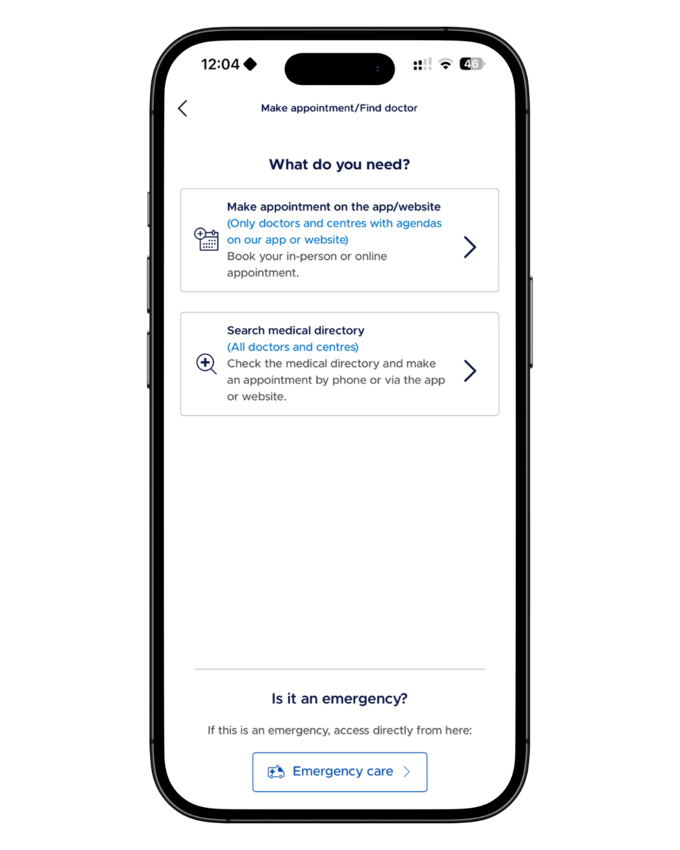
The first screen asks “What do you need?” and offers two paths, in the app’s own words:
Make appointment on the app/website — “only doctors and centres with agendas on our app or website”. Book your in-person or online appointment directly.
Search medical directory — all doctors and centres. Check the directory and make the appointment by phone, or via the app or website where available.
So if a doctor doesn’t appear in the booking flow, they’re not gone — search the directory and book by phone instead.
The booking router — book in-app, or search the whole directory. Note the emergency shortcut at the bottom. Screenshot from the Mi Sanitas app — details shown are example data.
The booking form
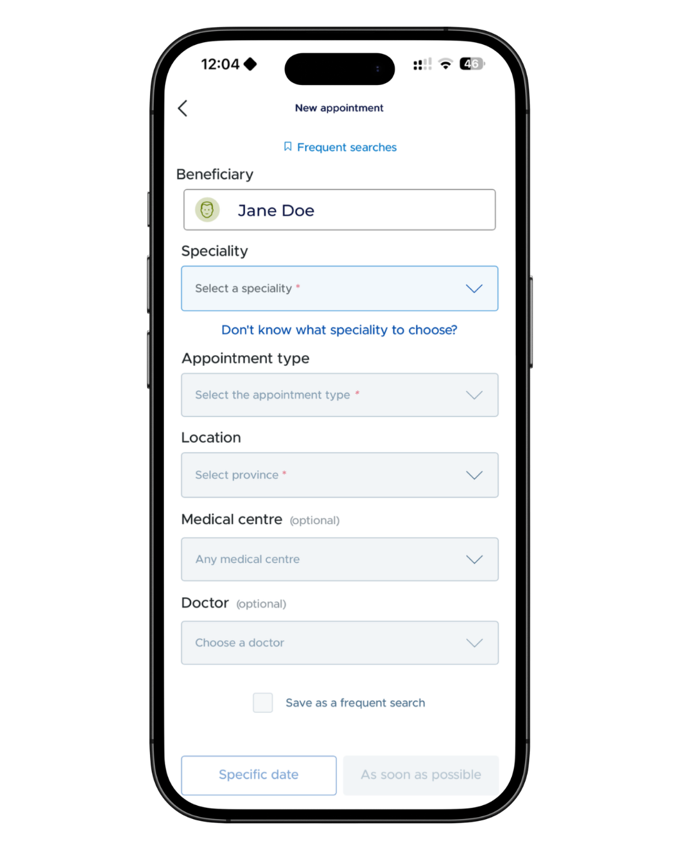
The New appointment form asks for: the beneficiary (who the appointment is for), the speciality (with a “Don’t know what speciality to choose?” helper), the appointment type, the province, and — optionally — a specific medical centre and doctor. You can save the search as a frequent search, then choose Specific date or As soon as possible.
Where our walkthrough ends: the steps above are what we’ve verified first-hand. We haven’t documented the screens beyond the date choice, so this guide doesn’t describe them. If you’re unsure a booking was made, check Appointments in the More menu, or ask Sanitas.
The New appointment form — down to the date choice, where this guide’s verified steps end. Screenshot from the Mi Sanitas app — details shown are example data.
Finding doctors and centres
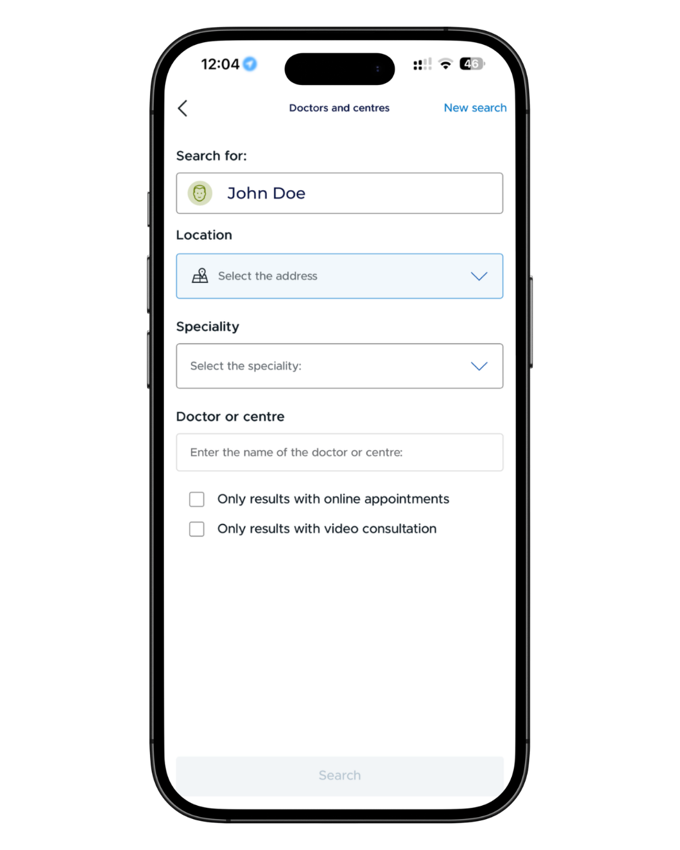
The Doctors and centres search covers the whole network: pick who you’re searching for, set the location, choose a speciality or type a doctor or centre name — and use the two filters: only results with online appointments, and only results with video consultation.
The app’s language doesn’t change who you speak to — for clinicians who speak English, see our guide to English-speaking Sanitas doctors.
The doctor search — location, speciality, name, and the online-appointment and video-consultation filters. Screenshot from the Mi Sanitas app — details shown are example data.
Video consultations
The app also offers video consultations, including a 24-hour medical consultation through Sanitas’s digital health service — see our Sanitas Blua digital health guide.
Emergencies and getting help
Serious or life-threatening emergency? Call 112 now — Spain’s emergency number. Do not contact Spanish Health Insurance first.
Urgent medical advice through Sanitas: the Mi Sanitas app includes a video consultation for emergencies with a doctor, in the app’s Emergency care section where shown. This is not a replacement for 112 in a serious emergency.
Sanitas emergency numbers: in the app under Useful telephone numbers, Sanitas lists 24-hour emergencies: 91 752 29 10 · 900 906 207.
App login, card-loading or technical problems: only Sanitas can fix these. Use the Contact section at the bottom of the app’s More menu — telephone numbers, a contact form and offices — or Sanitas Customer service: 91 752 28 52 · 93 362 34 49 · 900 906 210.
Separately from the above: for non-urgent questions about your policy or your documents, you can reach us through our contact page.
Frequently asked questions
Tap Make appointment/Find doctor on the Home screen. The app first asks what you need: book on the app or website, or search the whole medical directory. The booking form then asks who the appointment is for, the speciality, the appointment type, the province, and — optionally — a specific centre or doctor, before you choose a specific date or “as soon as possible”.
The app itself says it: in-app booking covers only doctors and centres with agendas on the app or website. For everyone else, use Search medical directory — the app’s wording is to check the directory and make the appointment by phone, or via the app or website where available.
Use the Doctors and centres search: choose who you’re searching for, set the location, pick a speciality, or type the name of a doctor or centre directly.
Yes — the search has two tick-boxes: “Only results with online appointments” and “Only results with video consultation”.
Honestly: this guide’s verified steps end at the date choice — we haven’t documented the screens beyond it. If you’re unsure whether a booking went through, check the Appointments section in the app’s More menu, or contact Sanitas.
Call 112 first — Spain’s emergency number. The booking screen itself points to the app’s Emergency care section, which offers an emergency video consultation, emergency telephone numbers and a search for emergency centres. None of that replaces 112 in a serious emergency.
Not necessarily — the app’s language only changes the interface. See our guide to English-speaking Sanitas doctors, and our guide to using Mi Sanitas in English.