Mi Sanitas is officially available in English. The language setting lives in your profile: open More → Administrative procedures → Profile and contact and set Preferred language to English.
This guide shows exactly where the setting is, what the app offers, and what to honestly expect from the English interface.
Where the language setting is
The setting sits in your profile — there is no “Settings” entry in the More menu, which is why people struggle to find it. Here’s the route:
Open the app and tap More (bottom-right of the screen).
Tap Administrative procedures.
Tap Profile and contact — this opens your My details and policies screen.
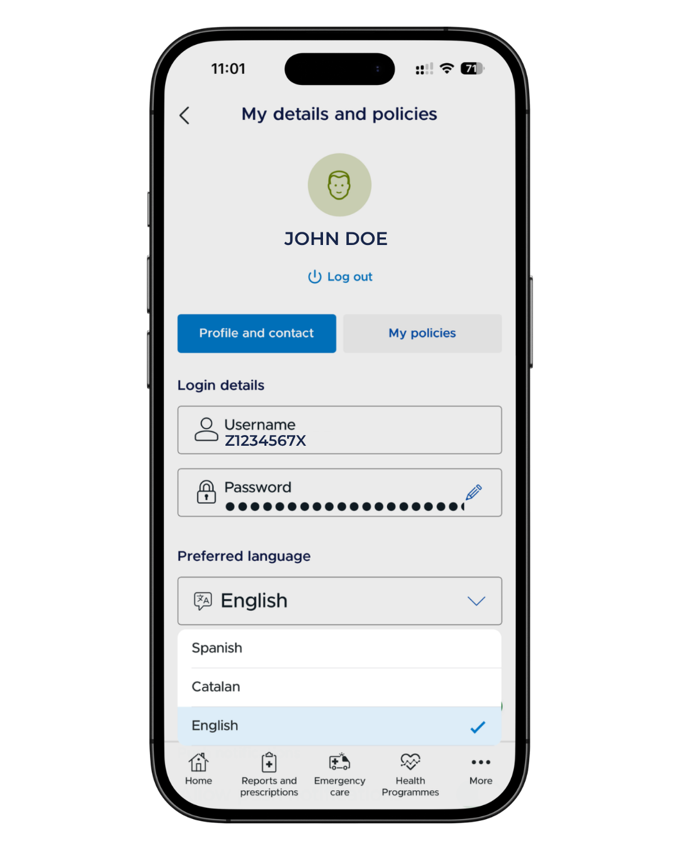
On the Profile and contact tab, below your login details, find Preferred language.
Choose your language — the picker offers Spanish, Catalan and English.
If your app is currently in Spanish, the menus to look for are Más (More), Gestiones (Administrative procedures) and Perfil y contacto (Profile and contact).
The Preferred language setting — under Profile and contact, with Spanish, Catalan and English. Screenshot from the Mi Sanitas app — details shown are example data.
Mostly English — with the odd Spanish label
With English selected, the main screens — home, appointments, your card, documents, reimbursements — display in English. Honestly, though, it isn’t a perfect translation: a few Spanish labels still appear (the security-PIN screen says Clave, and some system menus pop up in Spanish), and one or two English labels are odd translations — “Medical steering wheels” means referral slips (volantes médicos).
We keep a short list of the confusing labels and what they mean on our Mi Sanitas help hub.
App language is not doctor language
Switching the app to English changes the interface — it doesn’t change who you speak to at an appointment. If you want an English-speaking clinician, that’s a separate search: see our guide to English-speaking Sanitas doctors, or ask us and we’ll help you look in your area.
Your documents can follow you into English too: the app’s certificates download with a Spanish or English language choice — see your Sanitas policy documents.
Emergencies and getting help
Serious or life-threatening emergency? Call 112 now — Spain’s emergency number. Do not contact Spanish Health Insurance first.
Urgent medical advice through Sanitas: the Mi Sanitas app includes a video consultation for emergencies with a doctor, in the app’s Emergency care section where shown. This is not a replacement for 112 in a serious emergency.
Sanitas emergency numbers: in the app under Useful telephone numbers, Sanitas lists 24-hour emergencies: 91 752 29 10 · 900 906 207.
App login, card-loading or technical problems: only Sanitas can fix these. Use the Contact section at the bottom of the app’s More menu — telephone numbers, a contact form and offices — or Sanitas Customer service: 91 752 28 52 · 93 362 34 49 · 900 906 210.
Separately from the above: for non-urgent questions about your policy or your documents, you can reach us through our contact page.
Frequently asked questions
Yes. English is one of the app’s interface languages, alongside Spanish and Catalan. You choose it in your profile — open More, then Administrative procedures, then Profile and contact, and set Preferred language to English.
In your profile, not in a settings menu. Open More, then Administrative procedures, then Profile and contact — on the Profile and contact tab, under your login details, you’ll find the Preferred language field.
No — the More menu has no Settings entry; it runs through sections like Appointments, Blua, My Health and Administrative procedures and ends at Contact. That’s exactly why the language setting is hard to find: it lives in your profile, under Profile and contact.
The Preferred language picker in the app offers Spanish, Catalan and English.
A few Spanish labels remain here and there — for example the security-PIN screen shows the placeholder “Clave” (Spanish for PIN), and some system menus appear in Spanish. The main screens are in English; expect the odd Spanish label rather than a perfect translation.
It’s an odd translation of volantes médicos — referral slips, the paperwork a GP gives you to see a specialist. Our Mi Sanitas help hub keeps a short table of the confusing labels and what they mean.
The app’s certificates download with a language choice — when you download the Coverage certificate Spain, you pick the beneficiary and then choose Spanish or English. See our guide to your Sanitas policy documents.
Not necessarily — the app language only changes the interface, not who you speak to. If you want an English-speaking doctor, that’s a separate question: see our guide to English-speaking Sanitas doctors.