Reports and prescriptions in Mi Sanitas

Your medical reports and prescriptions live in their own tab — Reports and prescriptions, in the app’s bottom navigation bar. This short guide shows what’s there and clears up the most common mix-up.

What you’ll find there

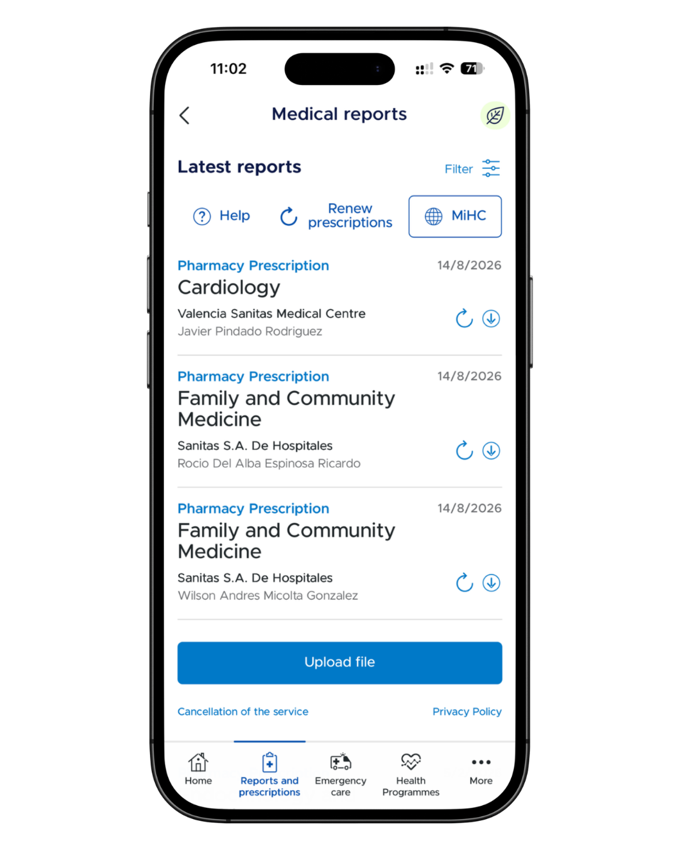
The tab lists your latest medical reports and pharmacy prescriptions — each with its date, the issuing centre and the doctor, and a download control beside it. Prescriptions also carry a renew control, and there’s a Renew prescriptions button at the top plus an Upload file button at the bottom for adding your own documents. We haven’t documented the renewal steps beyond those buttons, so this guide doesn’t describe them.

The Reports and prescriptions tab in the Mi Sanitas app showing a list of prescriptions with dates, centres and doctors, renew and download controls, and an Upload file button
The Reports and prescriptions tab — download or renew controls per entry, and Upload file at the bottom. Screenshot from the Mi Sanitas app — details shown are example data.

The common mix-up: this is not your policy paperwork

Reports and prescriptions holds medical documents. Your policy documents — conditions, certificates, the Request card button — live in Policy and documentation under More → Administrative procedures. See your Sanitas policy documents.

Getting help

  • A report won’t download, or a renewal fails? Only Sanitas can help with issues inside the app. Use the Contact section at the bottom of the app’s More menu — telephone numbers, a contact form and offices — or Sanitas Customer service: 91 752 28 52 · 93 362 34 49 · 900 906 210.
  • A question about what your cover includes? You can reach us through our contact page.

Frequently asked questions

It’s one of the main tabs in the bottom navigation bar, next to Home and Emergency care.

Your medical reports and pharmacy prescriptions — each entry shows the date, the issuing centre and the doctor, with a download control beside it.

The tab has a Renew prescriptions button and a renew control beside each entry. We haven’t documented the steps beyond those buttons, so if a renewal doesn’t go through, contact Sanitas.

Yes — there’s an Upload file button at the bottom of the list.

No — this tab is medical only. Your policy paperwork lives in Policy and documentation, under More → Administrative procedures; see our policy documents guide.