If your Sanitas card hasn’t arrived yet and you have an appointment coming up, you don’t need to wait for the post: a digital version of your Sanitas card is available in the Mi Sanitas app. You can show it at the medical centre in place of the physical card.
This guide explains where the digital card lives, what’s on it, and what to do if a centre can’t scan it.
Where to find your digital card
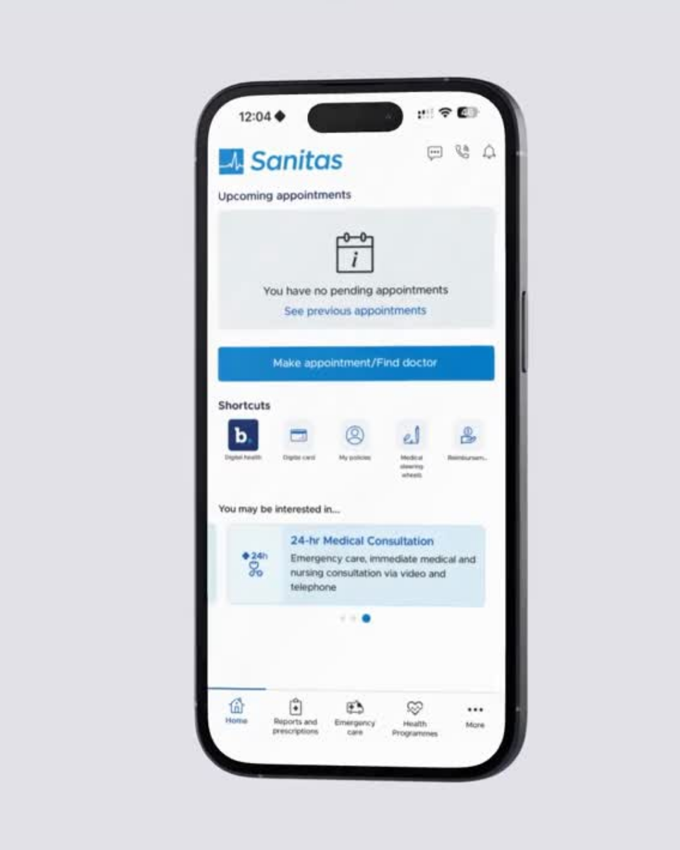
Open the Mi Sanitas app and log in. You’ll find Digital card in two places: as a shortcut on the Home screen, and under More → Administrative procedures.
If your app is in Spanish, the card button is labelled Tarjeta Digital and the More menu appears as Más.
The Home screen — Digital card sits in the shortcuts row. Screenshot from the Mi Sanitas app — details shown are example data.
What your digital card shows
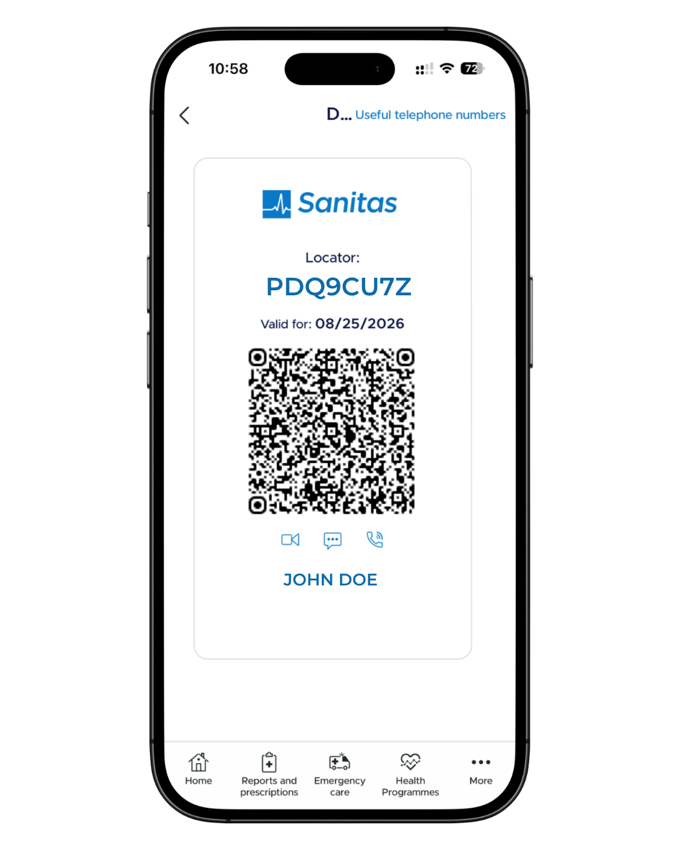
The digital card carries three things:
A locator code (localizador) — the reference a medical centre uses to identify you.
A QR code — scanned at reception instead of a physical card.
A “valid for” date — the date the current locator and QR code are valid.
The card screen also gives you one-tap access to Sanitas’s useful telephone numbers and contact options.
The digital card — locator code, QR code and valid-for date. Screenshot from the Mi Sanitas app — details shown are example data.
Your card is generated fresh — that’s the point
The digital card isn’t a static card you keep a copy of. The app generates a current security locator when you open the digital card, and the card shows the date it is valid for (the “Valid for” line). It is designed to be shown from the app rather than saved, shared or added to a wallet — a copied, screenshotted or photographed card goes out of date, so nobody can take a picture of your card and use it.
In practice that means: whenever you need your card — for example before an appointment — open Digital card in the app and show the current card. If a card seems to be refused, the usual reason is an out-of-date code: open the app and show the current one.
Because the card is generated fresh, there is nothing to share and nothing to save to a phone wallet — that’s by design, not a missing feature.
Using your card at a medical centre
According to Sanitas’s own guidance: at a Sanitas medical centre or hospital, reception scans the QR code on your digital card with a QR reader.
At a partnered centre in the Sanitas network (centro concertado) that doesn’t have a QR reader, give them the locator number from your card instead. The locator number is the fallback that works when the scanner doesn’t — it identifies your policy the same way the QR code does.
Sanitas cover works across the cuadro médico (medical directory) — the network of collaborating centres and professionals across Spain — not only at Sanitas-owned centres. You can check which centres are in the network near you in our medical directory guide.
Need a physical card as well?
A physical card can be requested from the Policy documentation screen of the Mi Sanitas app — there’s a Request card button at the bottom of that screen. See our guide to your Sanitas policy documents for where that screen lives.
Emergencies and getting help
Serious or life-threatening emergency? Call 112 now — Spain’s emergency number. Do not contact Spanish Health Insurance first.
Urgent medical advice through Sanitas: the Mi Sanitas app includes a video consultation for emergencies with a doctor, in the app’s Emergency care section where shown. This is not a replacement for 112 in a serious emergency.
Sanitas emergency numbers: in the app under Useful telephone numbers, Sanitas lists 24-hour emergencies: 91 752 29 10 · 900 906 207.
App login, card-loading or technical problems: only Sanitas can fix these. Use the Contact section at the bottom of the app’s More menu — telephone numbers, a contact form and offices — or Sanitas Customer service: 91 752 28 52 · 93 362 34 49 · 900 906 210.
Separately from the above: for non-urgent questions about your policy or your documents, you can reach us through our contact page.
Frequently asked questions
Yes. A digital version of your card is available in the Mi Sanitas app, and you can show it at the medical centre in place of the physical card. Open the app, log in, and open your digital card from the home screen.
In two places: as a shortcut on the Home screen, and under More, then Administrative procedures. In the Spanish interface the button is labelled Tarjeta Digital and the More menu appears as Más.
Three things: a locator code that identifies you, a QR code that reception can scan, and the date the card is valid for. The card also links straight to Sanitas’s useful telephone numbers.
The reference a medical centre uses to identify you — in Spanish, the localizador. Reception can use it instead of scanning the QR code, and it changes together with the card, so always read it from the current card in the app.
By design. The app generates a current security locator when you open the digital card, and the card shows the date it is valid for. It’s a security measure: open the digital card in the app and it gives you a fresh, valid code whenever you need one — for example before an appointment.
No — and that’s deliberate. The card is designed to be shown from the app rather than saved, shared or added to a wallet: because the locator is freshly generated and only valid for the date shown, a saved copy, screenshot or photo of your card goes out of date. Nobody can copy your card and use it — you just open the app and show the current card when you need it.
Give reception the locator code shown on your card instead. According to Sanitas’s own guidance, at partnered centres in the Sanitas network that don’t have a QR reader, the locator code is the standard alternative.
Sanitas cover works across the cuadro médico (medical directory) — the network of collaborating centres and professionals across Spain — not only at Sanitas-owned centres. At Sanitas centres reception scans the QR code; at partnered centres without a QR reader, give them the locator code.
Request it from the Policy documentation screen in the app — open More, then Administrative procedures, then Policy and documentation, and use the Request card button at the bottom.